
Old article, but conceptually nothing has changed: use a transparent png as a cutaway to lay an image (words/title/etc.) on top of a clip.
Old article, but conceptually nothing has changed: use a transparent png as a cutaway to lay an image (words/title/etc.) on top of a clip.
Instagram’s Hyperlapse can produce astonishing video, using the iPhone’s gyroscopes to perform auto-stabilization. It can do this in time-lapse mode, and, surprisingly (for an app called “Hyperlapse”), 1X straight-up video.
Austin Mann has a new page with some great tips and examples of how to use it. Tip #1 explains how to use 4-finger-tap to access 1080p and much more.
A solution for syncing separately-recorded audio and video in older versions of iMovie. Newer versions (> 10.1) seem to work fine.

MPEG Streamclip is a powerful video conversion tool. It has not been updated to work flawlessly with newer versions of OS X. It does, however, convert video to Apple’s ProRes, video format, used widely across the industry, if you have downloaded and installed the Pro Video codecs. This conversion seems to avoid the iMovie audio/video sync bug. File > Export to QuickTime… > Options > Apple ProRes 422 LT
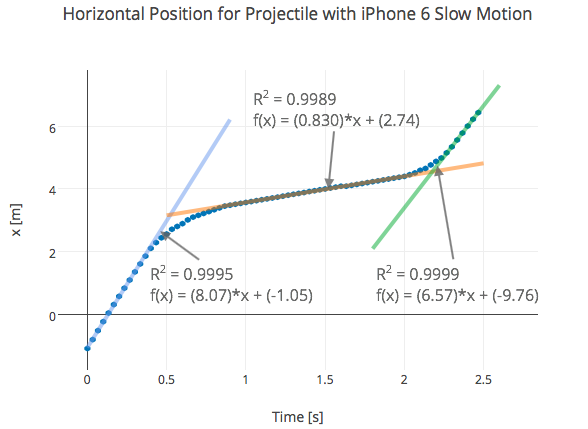
Interesting analysis of how the new slow motion algorithm works on iPhone 6/6+.
FStoppers has a major article on the viral skiing video “One Of Those Days Part 2.” They wondered the same thing we did: how did they do the “putting on the googles in the mirror” shot? It’s discussed in the article (short answer: After Effects, and in the comments, in much more detail.
Interesting subtext about the “studied casualness” of the video.

Might be a fun project – shooting a convincing forced perspective scene using a miniature. Would work well even with a fixed-focus camera, since it’s focused from 1 or 2 feet to infinity.
Red 3: Tuesday, 1/20: 11:30 am, Room 107, with mp4, flashdrive-able
Blue 2: Friday, 1/23: 9:37 am, Room 107, with mp4, flashdrive-able

The plug-in “ClickToFlash” tells Safari NOT to load Flash files. When a website sees this refusal, it often will substitute a straight HTML5 file. If you need to download it, right-click on the file – once it starts playing – and choose one of the download options. Files almost always come down in mp4 format.
The developer also has another plug-in, “ClickToPlugin,” that tries to block a much wider range of video plug-in formats. It is harder to use.
But not with Macs (PC only).
 Understanding Film