
- How Babies was made, Time magazine
- Interviews with the parents, Slate
- Small profile on Hattie’s parents (includes facts re: shooting – 400 hours of film over two years)


The dialogue script (3,666 words).
Miller recruited his wife, Margaret Sixel, to edit the film, as he felt she could make it stand out from other action films. Sixel had 480 hours of footage to edit; watching it took three months. The film contains about 2,700 cuts of its entire running length, which is equivalent to 22.5 cuts per minute compared to The Road Warrior’s 1,200 cuts of its 90-minute running time equivalent to 13.33 cuts per minute. The frame rate was also manipulated. “Something like 50 or 60 percent of the film is not running at 24 frames a second, which is the traditional frame rate,” said Seale. “It’ll be running below 24 frames because George, if he couldn’t understand what was happening in the shot, he slowed it down until you could. Or if it was too well understood, he’d shorten it or he’d speed it up back towards 24. His manipulation of every shot in that movie is intense.”
– Wikipedia, from Wired, Campaign Brief, Cinefex, Vanity Fair, The Sydney Morning Herald, Miami Herald, HitFix.
Editing awards, Mad Max – Fury Road:
AACTA Award for Best Editing
Academy Award for Best Film Editing
ACE Eddie Award for Best Edited Feature Film – Dramatic
BAFTA Award for Best Editing
Boston Society of Film Critics Award for Best Editing
Chicago Film Critics Association Award for Best Editing
Critics’ Choice Movie Award for Best Editing
EDA Award for Best Editing
FCCA Award for Best Editing
Gold Derby Award for Best Film Editing
Online Film & Television Association Award for Best Film Editing
Online Film Critics Society Award for Best Editing
San Diego Film Critics Society Award for Best Editing
San Francisco Film Critics Circle Award for Best Film Editing
St. Louis Film Critics Association for Best Film Editing
Washington D.C. Area Film Critics Association Award for Best Editing
YouTube BTS for the soundtrack by JunkieXL
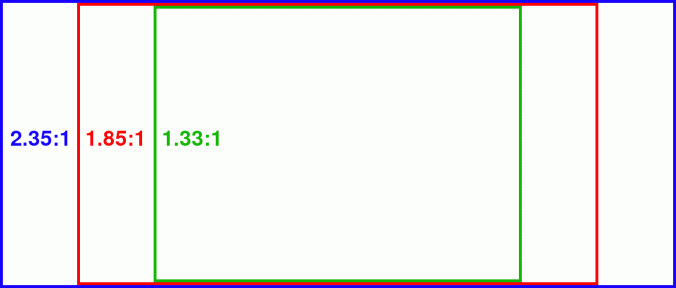
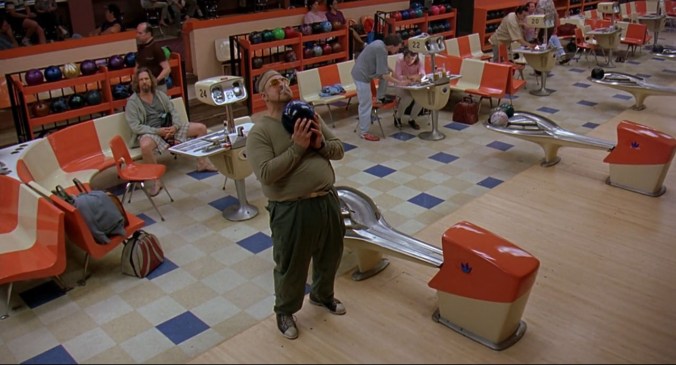
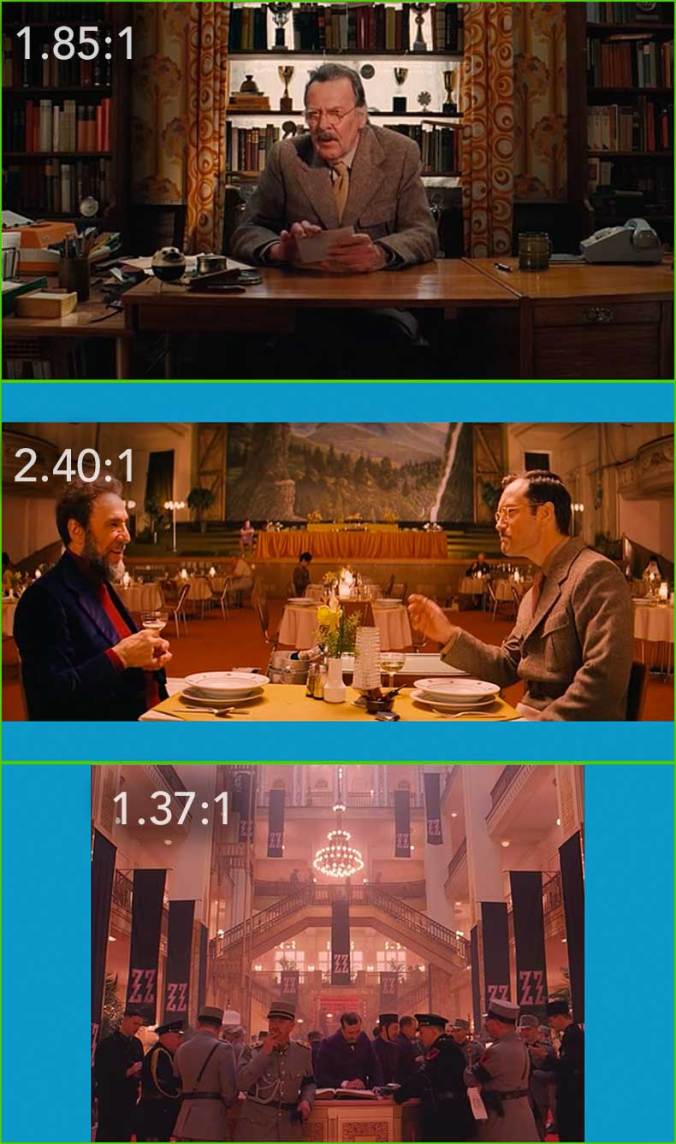
Aspect ratio matters. Imagine these films in another ratio. They don’t work.
Big Lebowski | 1.85 : 1
1280 x 692
Ghost Dog | 1.85 : 1
1280 x 692

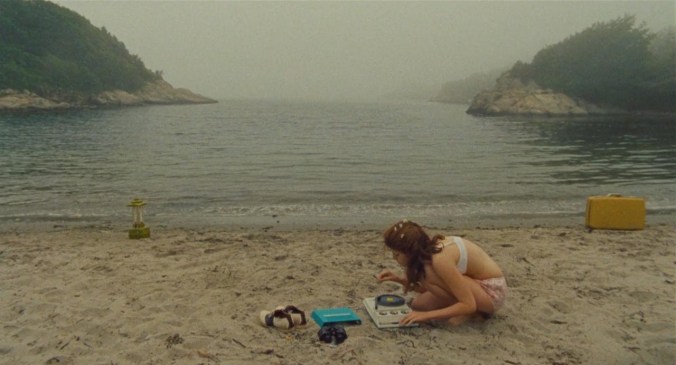
Moonrise Kingdom | 1.85 : 1
1280 × 692
Apocalypse Now | 2.35 : 1
1280 × 545

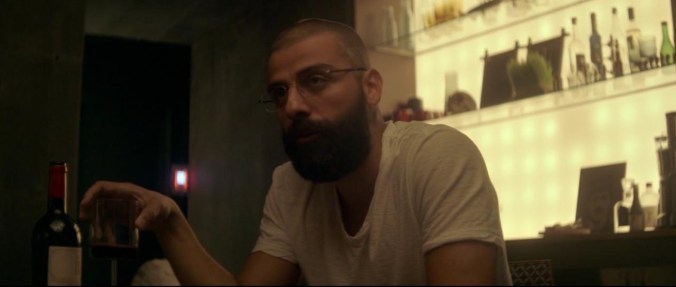
Ex Machina | 2.35 : 1
1280 × 545
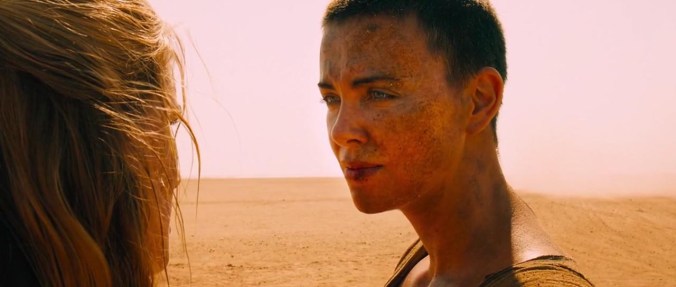
Mad Max – Fury Road | 2.35 : 1
1280 × 545
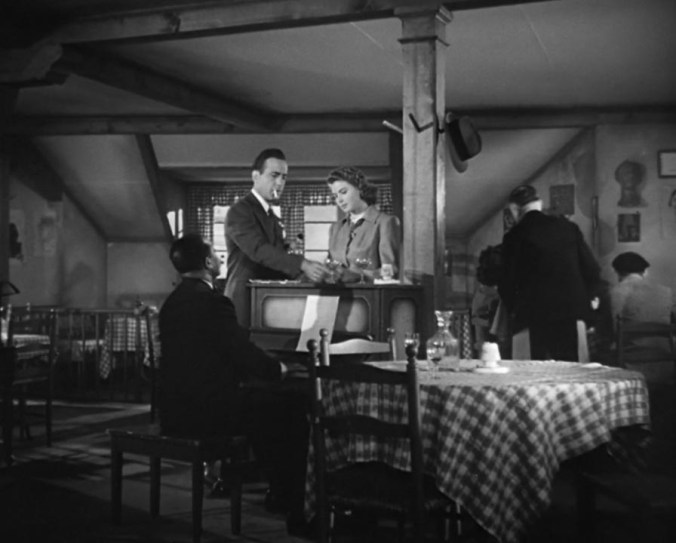
Casablanca | 1.37 : 1 (“Academy ratio”)
986 x 720
Grand Budapest Hotel | 1.37, 1.85, and 2.35:1
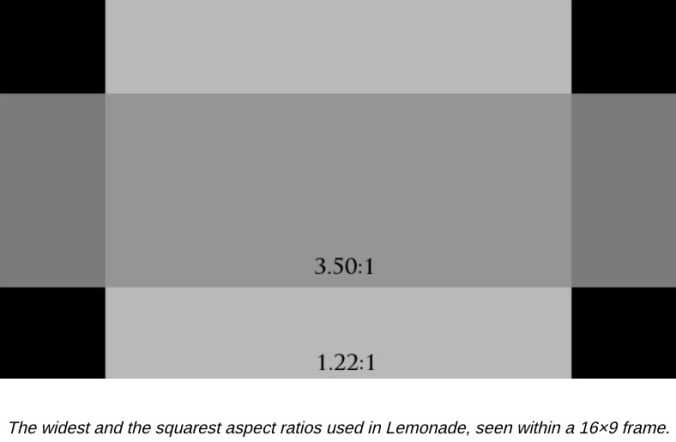
And Beyonce’s Lemonade:
“Beyonce’s Lemonade Video is an Aspect Ratio Orgy”
1.22:1 (fake security camera footage)
1.33:1 (mostly used for archival/home video)
1.78:1 (half of Lemonade used 16×9 framing, typically color)
2.20:1 (only seen once, at the beginning)
2.39:1 (“standard” widescreen was used once for an entire song)
2.67:1 (typically black and white)
2.85:1 (spotted once)
3.50:1 (color footage interspersed through the film)
Sometimes you want the effect produced by true W I D E S C R E E N, wider than the 16:9 default of iMovie or most cameras (Filmic Pro, however, gives you many wide screen aspect choices). One way to do it is to film in 16:9, keeping the wider aspect in mind — you can even put painter’s tape across the top and bottom of your viewfinder screen to help you visualize the narrower height — and then do the actual crop in post.
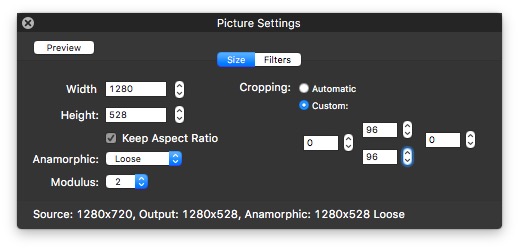
Just use HandBrake. Window > Picture Settings > crop 96 pixels off the top and bottom (or whatever numbers work for you):
High-powered cross-platform film editor – free and premium versions. Includes waveform syncing of multiple clips. Description from Macintouch:
DaVinci Resolve is professional, cross-platform video editing and production software from Blackmagic Design Pty. Ltd. with a powerful collection of features, including “Hollywood’s most advanced color corrector.” Editing features include various edit types (overwrite, insert, ripple overwrite, replace, fit to fill, append at end etc.) and styles “from drag-and-drop to the timeline, to three-point precision editing driven by customizable keyboard shortcuts”, multicam/multisource playback in a gridded window, finishing tools, VFX support and far more. The new version integrates Fairlight audio tools for recording, editing, mixing, sweetening, finishing and mastering, including 3D audio support. Resolve also includes multi-user collaboration features with individual logins, media management and support for specialized hardware control panels.
DaVinci Resolve 14 public beta 3 is available as a free download for OS X 10.11 and up, plus Windows and Linux. Resolve 12.5.5 is available as a free download in return for registering name, address, phone and email information, while DaVinci Resolve Studio 12.5 is priced at $299:“The free version of DaVinci Resolve has all of the professional editing, legendary color correction and Fairlight audio tools you need for SD, HD and Ultra HD work at up to 60 frames per second. DaVinci Resolve Studio adds support for 4K and higher, along with frame rates up to 120 fps. It also includes dozens of additional image processing features and filters that are not in the free version. This includes film grain, temporal and spatial noise reduction, amazing new face enhancement tools, lens flares, lens distortion correction, optical quality blur and mist effects, match move, warping and much more!
Unlike cloud based software, DaVinci Resolve Studio does not require a connection to the internet and there are no monthly subscription fees. Now you can get DaVinci Resolve Studio for only $299, which is 50% less than the cost of popular cloud subscriptions. Plus, you get full nonlinear editing, advanced color correction and a massive suite of new Fairlight audio tools, all included in the one easy to buy solution.”

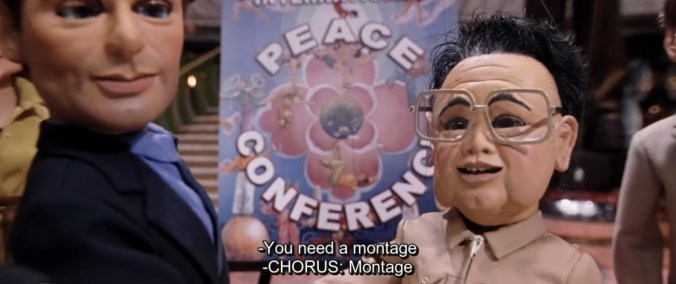
Show a lot of things happening at once,
Remind everyone of what’s going on
And with every shot you show a little improvement
To show it all would take too long
That’s called a montage
Oh we want montage
Your assignment: make a montage. There are many definitions/subsets of “montage,” but the one that we’ll use is “a series of very short shots edited into a 3 – 4 minute sequence to condense space (at least 4 locations), time (ostensibly at least 4 days), and information.”
You’re not necessarily telling a whole story, just making a sequence that shows the passage of time, often with “a little improvement,” as Team America has it, or more generally, just “change.” Something needs to be very different at the end than it was at the beginning.
It may help to imagine the story in which this montage fits, but the only part you need to make is the montage itself. Unless you just have to, use no diegetic sound — unify the whole thing with one piece of music, so you don’t have to deal with editing/syncing audio.
Random ideas: have a twist — set up the idea and then surprise us; do an homage — even copy something shot for shot; use your song as inspiration (c.f., almost any music video); think of your shots as video-only — all audio is the soundtrack; use a film convention (or 2 or 3) as inspiration; get better at cooking; learn how to make something; get better at feeding a baby; get a dog to do a trick; learn how to parallel park; conversely, work at something really hard and fail at it, either comically or tragically. (BTW: No “Rocky” montage music. It’s just too clichéd. Even making fun of it is clichéd.)
Have a least one shot you are proud of technically, maybe a tracking shot, or a rack focus, or an aerial shot, or a match cut, etc. Montages are almost all quick cuts, 30+ per minute, so there should be very few long takes. Try to mix up the shots – close-up, medium, long, etc. Note: although maybe 20 seconds can be time lapse / stop motion, the bulk of your piece needs to be a traditional montage.
Please give your final film some ease on both ends — maybe fade from and to black; maybe have credits; please begin and end audio purposefully.
 Understanding Film